![BizTalk] 'Time for reflection is gone, work has increased'... The disappearing time to think...](https://img2.daumcdn.net/thumb/R658x0.q70/?fname=https://t1.daumcdn.net/news/202602/11/chosun/20260211180126423ewbu.png)
📸 BizTalk] 'Time for reflection is gone, work has increased'... The disappearing time to think...
Thought AI Would Reduce Workload? It Actually Increased It.
At the beginning of 2026, with ChatGPT, Claude, and Copilot now essential tools for knowledge workers, we need to ask ourselves honestly: "Are we really getting more downtime thanks to AI?"
A study published by Harvard Business Review (HBR) in February 2026 shocked many with its findings. The title alone hits hard: "AI Doesn't Reduce Work — It Intensifies It."
Anthropic reached a similar conclusion around the same time through a randomized controlled trial. While developers using AI assistance wrote code faster, their short-term conceptual understanding actually declined.
So why is this happening?
![Infographic] 2018 KBSI Statistics at a Glance : Naver Blog](https://mblogthumb-phinf.pstatic.net/MjAxOTAyMjhfNzEg/MDAxNTUxMzIwODQzMjk1.bWBla1BCZFphaB_2ifoFfYwcpi6nIbJLZ2tQkXduUzkg.6dH20R4jniod1EFPrgjmtfuanBq9BalbhKhLroVU16sg.PNG.open_kbsi/20190225_%EC%9D%B8%ED%8F%AC%EA%B7%B8%EB%9E%98%ED%94%BD_%EC%97%B0%EB%8F%84%EB%B3%84%EB%B6%84%EC%84%9D%ED%98%84%ED%99%A9_%EC%88%98%EC%A0%95%EB%B3%B8.png?type=w800)
📸 Infographic] 2018 KBSI Statistics at a Glance : Naver Blog
📊 Research Summary: The Reality in Numbers
The HBR study tracked thousands of office workers after AI adoption. The key findings:
- Average workload handled within the same time frame increased by 40% after AI adoption
- But average departure time from work became 15 minutes later
- Workers who felt they had more free time thanks to AI: only 18%
Anthropic’s experiment with developers found:
- Coding speed with AI assistance: 55% faster
- Error rate when solving identical problems without AI: 38% higher (indicating increased dependency)
- Conceptual understanding test scores: significantly lower in the short term
Speed increased — but skills didn’t necessarily improve.
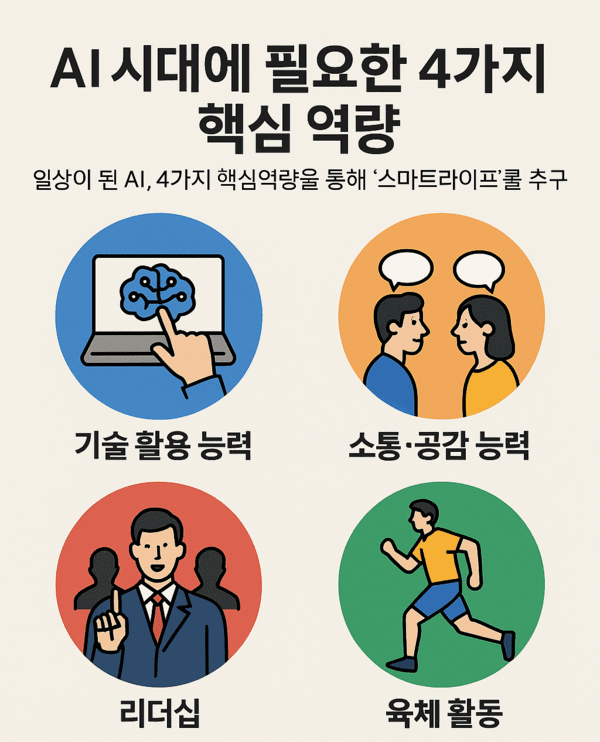
📸 In an age where AI replaces work, the 4 core competencies we need...
🔍 Why AI Increases Workload: 3 Key Reasons
1. Expectation Inflation
When AI is introduced, managerial and client expectations rise in tandem. If a report is delivered in one day, the next request will expect it in half a day. Fast output becomes the new baseline.
"AI doesn’t take work off our plate — it gives others more reason to add to it." — HBR Interview Respondent
2. Verification Overhead
AI-generated content must always be reviewed by humans. Hallucinations — where AI confidently presents false information as fact — remain a real issue. Even if AI drafts a document in 5 minutes, verifying and correcting it can take 30 minutes.
3. Cognitive Offloading
The more you outsource thinking to AI, the weaker your own cognitive muscles become. This is precisely the phenomenon warned about in the Anthropic study. As AI dependence grows, your ability to solve problems independently diminishes — eventually reaching a point where you can't function without it.
💡 AI Should Still Be Used — Just Smarter
These results aren’t a call to abandon AI. The problem isn’t the tool — it’s how we use it. Here are 4 ways to use AI wisely:
✅ 1. Use AI Outputs Only After Understanding Them
Never copy-paste AI-generated code, documents, or analyses blindly. Always read, comprehend, and adapt them yourself. This single habit prevents cognitive degradation.
✅ 2. Spend Time Saved by AI on Deep Thinking
Delegate repetitive, routine tasks to AI, then reinvest the time saved into strategic thinking, creative work, and relationship-building. Real productivity comes from here.
✅ 3. If You're a Team Leader, Rebalance Workloads
Don’t fall into the trap of assigning more tasks just because AI is available. The time gained should be invested in team growth, learning, and recovery — not just more output.
✅ 4. If You're Learning, Use AI Only as a Reference
While learning to code, write, or analyze, intentionally limit AI use. Let it serve as a reference for best practices, but always maintain the habit of doing things yourself.
🎯 Conclusion: AI Is a Tool, Not Magic
AI in 2026 is undeniably powerful. But the HBR and Anthropic studies deliver a sobering reality check: AI doesn’t automatically make life easier.
Using AI well means not letting it replace your work, but collaborating with it to do better work. Don’t sacrifice depth for speed, or growth for efficiency.
True competitive advantage in the AI era doesn’t come from using AI like everyone else — it comes from using AI in a way that’s authentically your own.
댓글
댓글 쓰기