2026 PWA Complete Guide - Practical Strategies for Building Native-Level Web Apps Without App Stores

📸 4 important points to know about Progressive Web Apps (PWA ...
What is a PWA in 2026? — Native-Level Web Apps Running in Your Browser
Progressive Web Apps (PWAs) are web applications that deliver native app-level experiences using only web technologies. As of 2026, with all major browsers—Chrome, Edge, Firefox, and Safari—fully supporting Service Workers, Web App Manifests, and Web Push, PWAs have evolved from experimental technology to a production standard.
Notably, Apple began supporting Web Push for home screen PWAs starting with iOS 16.4, effectively resolving browser fragmentation—the biggest hurdle to PWA adoption. After transitioning to PWA, Pinterest achieved a 44% increase in mobile conversion rates and a 44% boost in ad revenue.
📸 2026 Guide | PWA vs Native App: Which Is Better for eCommerce?
PWA vs Native Apps — When Should You Choose Which?
As of 2026, the criteria for choosing between PWAs and native apps have become clear.

📸 Progressive Web Apps Explained: Features & Benefits Guide
When PWAs Are Ideal
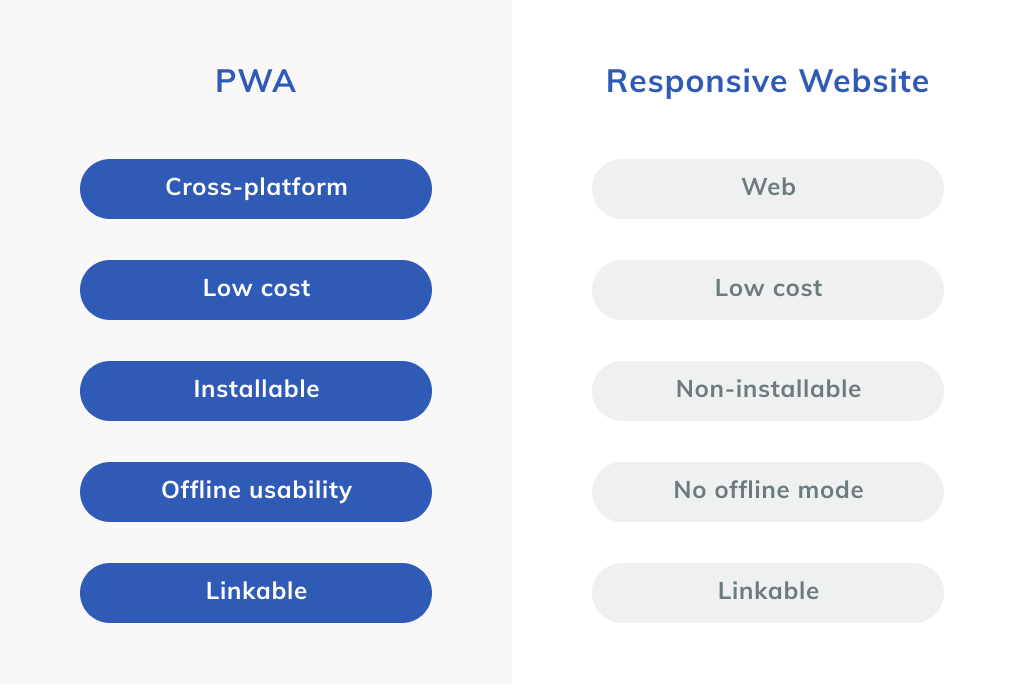
- Reduced Development Costs: Cover all platforms with a single codebase, saving 68% in development costs compared to native apps
- Instant Updates: Deploy immediately without app store review processes
- Low Barrier to Entry: Access via URL, installation is optional
- SEO Optimization: Drive organic search traffic through web indexing
-copy-2-Photoroom.webp)
📸 Progressive Web Apps - Benefits, Components and How it Works ...
When Native Apps Are Necessary
- When you need background location tracking, NFC, Bluetooth, or complex AR features
- When app store discovery is a primary user acquisition channel
3 Core PWA Technologies
1. Service Worker
A Service Worker is a JavaScript file that runs in the browser background, serving as the core for intercepting network requests, caching, and enabling offline functionality.
// Service Worker Registration (main.js)
if ('serviceWorker' in navigator) {
  window.addEventListener('load', () => {
    navigator.serviceWorker.register('/sw.js')
      .then(reg => console.log('SW registered:', reg.scope))
      .catch(err => console.error('SW registration failed:', err));
  });
}
Service Workers follow a install → activate → fetch three-stage lifecycle. Workbox 7 integrates seamlessly with Vite, webpack, and Next.js build pipelines, greatly simplifying Service Worker development.
2. 5 Caching Strategies
PWA performance heavily depends on which caching strategy you employ.
- Cache First: Optimal for static assets (CSS, fonts, images). Loads from cache first, only requests from network when unavailable
- Network First: Best for API responses and feeds where fresh data matters. Falls back to cache on network failure
- Stale While Revalidate: Responds immediately from cache, then updates in background. Ideal for UI and API responses
- Cache Only: For offline-only app scenarios
- Network Only: For payments, real-time data, and cases where caching is inappropriate
3. Web App Manifest
A JSON file that defines your app name, icons, theme colors, start URL, and more. When properly configured, the home screen install prompt displays automatically.
{
  "name": "My PWA App",
  "short_name": "MyApp",
  "start_url": "/",
  "display": "standalone",
  "theme_color": "#1a73e8",
  "background_color": "#ffffff",
  "icons": [
    { "src": "/icon-192.png", "sizes": "192x192", "type": "image/png" },
    { "src": "/icon-512.png", "sizes": "512x512", "type": "image/png" }
  ]
}
Implementing PWA with Next.js
As of 2026, the Next.js + Workbox combination is the standard for PWA implementation.
# Install next-pwa
npm install next-pwa

# next.config.js
const withPWA = require('next-pwa')({
  dest: 'public',
  disable: process.env.NODE_ENV === 'development',
  register: true,
  skipWaiting: true,
});

module.exports = withPWA({
  // Your Next.js configuration
});
PWA Performance Metrics — Measuring with Lighthouse
Chrome DevTools' Lighthouse automatically checks PWA quality.
- Installability: manifest.json validity, HTTPS, Service Worker registration
- Offline Functionality: Whether the basic page loads when network is blocked
- Core Web Vitals: LCP < 2.5s, FID < 100ms, CLS < 0.1
Thanks to caching, repeat visit load speeds are up to 2-3x faster. As of 2026, PWA installation rates in Chrome are approximately 67%, overwhelmingly higher than regular web apps.
2026 PWA Ecosystem Overview
Tooling maturity has significantly improved with Workbox 7, Vite PWA Plugin, and Next.js PWA. In particular, Workbox 7 offers enhanced TypeScript support, smaller bundle sizes, and improved Background Sync API. Starbucks, Twitter, and Instagram have already adopted PWA as their primary web strategy, delivering user experiences equivalent to native apps.
Common PWA Development Mistakes
- Not using HTTPS — Service Workers require HTTPS (localhost is the only exception)
- Missing cache version management — Old cache remains after updates, showing users outdated versions
- Overly aggressive caching — Never apply Cache First to dynamic API responses
- Missing manifest.json icons — Install prompt won't display without 512×512 icons
댓글
댓글 쓰기