📸 Cursor vs Windsurf: The Truth After Writing 50,000 Lines of ...
Cursor vs Windsurf — The 2026 AI IDE Showdown
As the AI coding assistant era fully takes off in 2026, the hottest debate among developers is undoubtedly Cursor vs Windsurf. Both claim to dramatically boost development productivity, but their approaches are completely different. Cursor adds powerful inline AI to the familiar VS Code-based development environment, while Windsurf aims for autonomous coding with an agent-based AI that understands entire projects.

📸 Cursor AI vs. Aide: Which AI Code Editor Comes Out on Top?
What is Cursor AI?
Cursor is an AI-first code editor built on top of Visual Studio Code. You can use existing VS Code extensions as-is while adding AI features, making the barrier to entry low.
📸 Curser vs. Cursor: What's the Difference?
Cursor Key Features
- Cmd+K (Inline Editing): Instantly modify selected areas with natural language instructions
- Composer: Multi-file editing support, enables large-scale refactoring
- Tab Autocomplete: Context-aware multi-line code suggestions
- @Codebase: Query using the entire codebase as context
- Model Selection: Directly choose from Claude 4 Sonnet, GPT-4o, o3, and more
📸 Tutorial - What is a Cursor? - Axialis Software
Cursor Pricing
- Free: 2,000 monthly autocompletions, 50 slow premium requests
- Pro: $20/month — Unlimited autocompletions, 500 fast premium requests
- Business: $40/user/month — Team management, SSO, privacy mode
What is Windsurf AI?
Windsurf (formerly Codeium) is an agent-based AI IDE that semantically understands entire project structures. Going beyond simple code completion, AI agents autonomously perform file creation, modification, and deletion. In 2025, Google hired Windsurf's core developers, pivoting the focus toward the enterprise market.
Windsurf Key Features
- Cascade: Agent mode. Autonomously handles file creation, modification, and execution with natural language instructions
- Full Project Context: Understands dependencies and structure even for unopened files
- UI Layout Generation: Create and modify UI components with natural language
- 1-Click Deployment: One-click production deployment integrated with Vercel and others
- Multi-IDE Support: Provides plugins for VS Code, JetBrains, and Vim
Windsurf Pricing
- Free: 25 Cascade executions per month, unlimited basic autocompletion
- Pro: $15/month — Unlimited Cascade, priority model access
- Enterprise: Custom pricing — SSO, on-premise deployment, SLA
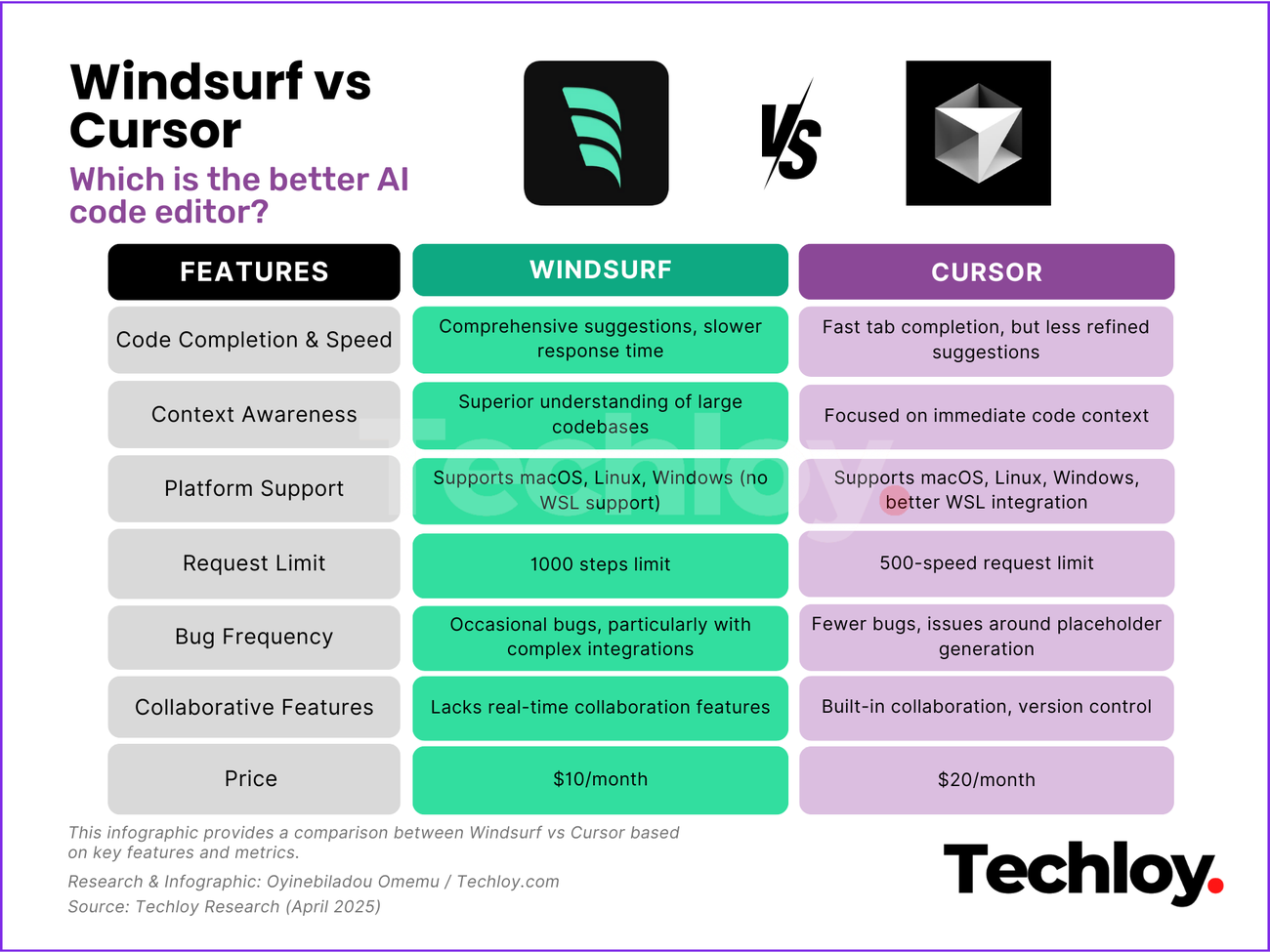
Key Features Comparison Table
| Feature | Cursor | Windsurf |
|---|---|---|
| Real-time Code Suggestions | ✅ Very Fast | ✅ Context-Aware |
| Agent Mode | Limited (Composer) | ✅ Full Cascade Support |
| Multi-file Context | △ Open Files Focused | ✅ Entire Project |
| Model Selection Freedom | ✅ Direct Choice of Claude 4, GPT-4o, etc. | △ Proprietary Model + BYOK |
| VS Code Extension Compatibility | ✅ 100% Compatible | △ Some Limitations |
| UI Generation Support | ❌ | ✅ |
| Response Speed | Very Fast | Slow on Large Projects |
| Pricing | $20/month | $15/month |
Which Developer Should Choose Which?
Choose Cursor If:
- You want to add AI to your current VS Code environment without switching
- You want to directly choose and use specific latest models like Claude 4, GPT-4o
- You're a solo developer who mainly works with quick inline editing and autocompletion
- You want to keep your existing extensions and keyboard shortcut settings intact
Choose Windsurf If:
- You're a team working with large monorepos or complex microservice architectures
- You're an agent-oriented developer who wants AI to "just handle it" when you explain
- You need full-stack automation like UI generation and one-click deployment
- Your team has lots of legacy code and understanding overall dependencies is crucial
2026 AI IDE Market Trends
The AI IDE market is evolving rapidly. Beyond GitHub Copilot, Cursor, and Windsurf, various tools like JetBrains AI Assistant, Amazon Q Developer, Zed AI are competing. In 2026, development is advancing quickly toward automating agentic workflows (issue → code → PR → deployment) beyond simple code completion.
In conclusion, choose Cursor if speed and familiarity are your priority, and Windsurf if you need agent-based autonomous coding. Both tools offer a 2-week free Pro trial, so I recommend trying them both before deciding.
댓글
댓글 쓰기