GitHub Actions Perfect Guide 2026 - Practical CI/CD Automation, AI Code Reviews, and Security Scanning Pipelines
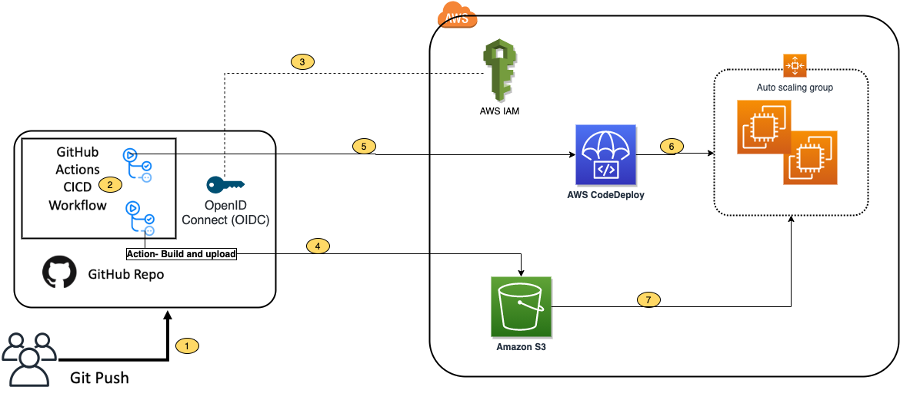
📸 Integrating with GitHub Actions – CI/CD pipeline to deploy a ...
What Is GitHub Actions CI/CD? Why It Matters More in 2026
GitHub Actions is GitHub's built-in CI/CD automation platform that responds to every GitHub event—code pushes, pull requests, issue creation—and triggers automated workflows. As of 2026, GitHub Actions has evolved significantly with AI-powered code review automation, automatic security vulnerability patching, and deep integration with GitHub Copilot, making it more powerful than ever.
This guide walks you step by step—from core concepts to building real-world CI/CD pipelines in 2026.
📸 How to Leverage GitHub Actions for Continuous Delivery and ...
Understanding GitHub Actions Core Architecture
GitHub Actions workflows are defined in YAML files inside the .github/workflows/ directory. The key concepts are:
- Workflow: The complete definition of an automated process (1 YAML file = 1 Workflow)
- Event: The trigger that starts the workflow (e.g., push, pull_request, schedule)
- Job: A unit of work that runs on a single virtual machine
- Step: Individual commands or Actions within a Job
- Action: Reusable units of work (over 15,000 available on GitHub Marketplace)
- Runner: The server that runs your workflow (GitHub-hosted or self-hosted)

📸 A Guide to Setting Up CI/CD Pipelines with GitHub Actions ...
Basic CI Pipeline Example in 2026
# .github/workflows/ci.yml
name: CI Pipeline

on:
  push:
    branches: [main, develop]
  pull_request:
    branches: [main]

jobs:
  test:
    runs-on: ubuntu-latest
    strategy:
      matrix:
        node-version: [20, 22]
    steps:
      - uses: actions/checkout@v4

      - name: Setup Node.js ${{ matrix.node-version }}
        uses: actions/setup-node@v4
        with:
          node-version: ${{ matrix.node-version }}
          cache: 'npm'

      - name: Install dependencies
        run: npm ci

      - name: Type check
        run: npm run type-check

      - name: Lint
        run: npm run lint

      - name: Test
        run: npm test -- --coverage

      - name: Upload coverage
        uses: codecov/codecov-action@v4
        with:
          token: ${{ secrets.CODECOV_TOKEN }}
📸 🤖🔐 From Code to Production: A Secure, AI-Assisted CI/CD ...
Key Feature 1: AI-Powered Code Review Automation
The most notable evolution of GitHub Actions in 2026 is AI-powered code review automation. Every time a pull request is opened, AI analyzes the code and automatically comments on potential bugs, security issues, and improvement suggestions.
# .github/workflows/ai-review.yml
name: AI Code Review

on:
  pull_request:
    types: [opened, synchronize]

jobs:
  ai-review:
    runs-on: ubuntu-latest
    permissions:
      contents: read
      pull-requests: write
    steps:
      - uses: actions/checkout@v4

      - name: AI Code Review
        uses: coderabbitai/ai-pr-reviewer@latest
        with:
          GITHUB_TOKEN: ${{ secrets.GITHUB_TOKEN }}
          OPENAI_API_KEY: ${{ secrets.OPENAI_API_KEY }}
          review_simple_changes: false
          review_comment_lgtm: false
Key Feature 2: Automated Security Scanning
By integrating GitHub Advanced Security with Actions, you can automatically scan code on every push. In 2026, AI-enhanced vulnerability detection identifies OWASP Top 10 issues with significantly higher accuracy.
Main Security Scanning Tools
- CodeQL: GitHub’s semantic code analysis engine, detects SQL injection, XSS, and other vulnerabilities
- Dependabot: Automatically detects dependency vulnerabilities and creates PRs to patch them
- Secret Scanning: Immediately alerts if API keys or tokens are accidentally committed
- Snyk: Scans open-source dependencies, IaC, and container images in one place
# .github/workflows/security.yml
name: Security Scan

on:
  push:
    branches: [main]
  schedule:
    - cron: '0 2 * * 1'  # Every Monday at 2 AM

jobs:
  codeql:
    runs-on: ubuntu-latest
    permissions:
      security-events: write
    steps:
      - uses: actions/checkout@v4

      - name: Initialize CodeQL
        uses: github/codeql-action/init@v3
        with:
          languages: javascript, typescript

      - name: Perform CodeQL Analysis
        uses: github/codeql-action/analyze@v3

  dependency-review:
    runs-on: ubuntu-latest
    steps:
      - uses: actions/checkout@v4
      - name: Dependency Review
        uses: actions/dependency-review-action@v4
        with:
          fail-on-severity: high
Key Feature 3: Multi-Environment CD Pipeline
The 2026 standard for CD is a dev → staging → production multi-stage deployment. Using GitHub Environments, you can set required reviewers, approval timeouts, and environment-specific secrets for each stage.
# .github/workflows/deploy.yml
name: Deploy

on:
  push:
    branches: [main]

jobs:
  deploy-staging:
    runs-on: ubuntu-latest
    environment: staging
    steps:
      - uses: actions/checkout@v4
      - name: Deploy to Staging
        run: |
          npx vercel --token ${{ secrets.VERCEL_TOKEN }} \
            --env DATABASE_URL=${{ secrets.STAGING_DB_URL }}

  deploy-production:
    needs: deploy-staging
    runs-on: ubuntu-latest
    environment: production  # Production deploy requires reviewer approval
    steps:
      - uses: actions/checkout@v4
      - name: Deploy to Production
        run: |
          npx vercel --prod --token ${{ secrets.VERCEL_TOKEN }} \
            --env DATABASE_URL=${{ secrets.PROD_DB_URL }}
Key Feature 4: Reusable Workflows for DRY Pipelines
When sharing the same CI/CD logic across multiple repositories, Reusable Workflows help avoid duplication. Define once, call from multiple projects—significantly reducing maintenance overhead.
# .github/workflows/reusable-deploy.yml (in a central repo)
on:
  workflow_call:
    inputs:
      environment:
        required: true
        type: string
    secrets:
      DEPLOY_TOKEN:
        required: true

jobs:
  deploy:
    runs-on: ubuntu-latest
    steps:
      - uses: actions/checkout@v4
      - name: Deploy
        run: ./deploy.sh ${{ inputs.environment }}
        env:
          TOKEN: ${{ secrets.DEPLOY_TOKEN }}

---
# Invoked in another project
jobs:
  call-deploy:
    uses: my-org/.github/.github/workflows/reusable-deploy.yml@main
    with:
      environment: production
    secrets:
      DEPLOY_TOKEN: ${{ secrets.DEPLOY_TOKEN }}
Practical Optimization Tips
1. Speed Up with Caching
- name: Cache node_modules
  uses: actions/cache@v4
  with:
    path: ~/.npm
    key: ${{ runner.os }}-node-${{ hashFiles('**/package-lock.json') }}
    restore-keys: ${{ runner.os }}-node-
2. Reduce Time with Parallel Execution
jobs:
  lint:
    runs-on: ubuntu-latest
    steps: [...]

  test:
    runs-on: ubuntu-latest  # Runs in parallel with lint
    steps: [...]

  deploy:
    needs: [lint, test]  # Deploy only if both pass
    steps: [...]
3. Prevent Unnecessary Runs with Conditionals
jobs:
  deploy:
    if: github.ref == 'refs/heads/main' && github.event_name == 'push'
    # Only deploy on main branch push
Optimizing GitHub Actions Costs (2026)
GitHub Actions is free for public repositories. For private repos, you get 2,000 free minutes per month before incurring charges (under the free plan). Key cost-saving strategies:
- Self-hosted Runners: Run workflows on your own hardware—unlimited compute at no cost per minute
- Path Filtering: Run only relevant workflows based on changed file paths
- concurrency settings: Automatically cancel duplicate runs on the same branch
- Maximize Caching: Reuse dependency and build caches to reduce execution time
Conclusion
In 2026, GitHub Actions has evolved beyond a simple CI/CD tool into a full automation platform with AI code reviews, automatic security scanning, and intelligent repository automation. Especially with tighter GitHub Copilot integration, it’s now possible to automate the entire development lifecycle—from code writing to deployment and security—on a single platform. Start implementing Actions in your projects today to enhance code quality and developer productivity.
댓글
댓글 쓰기