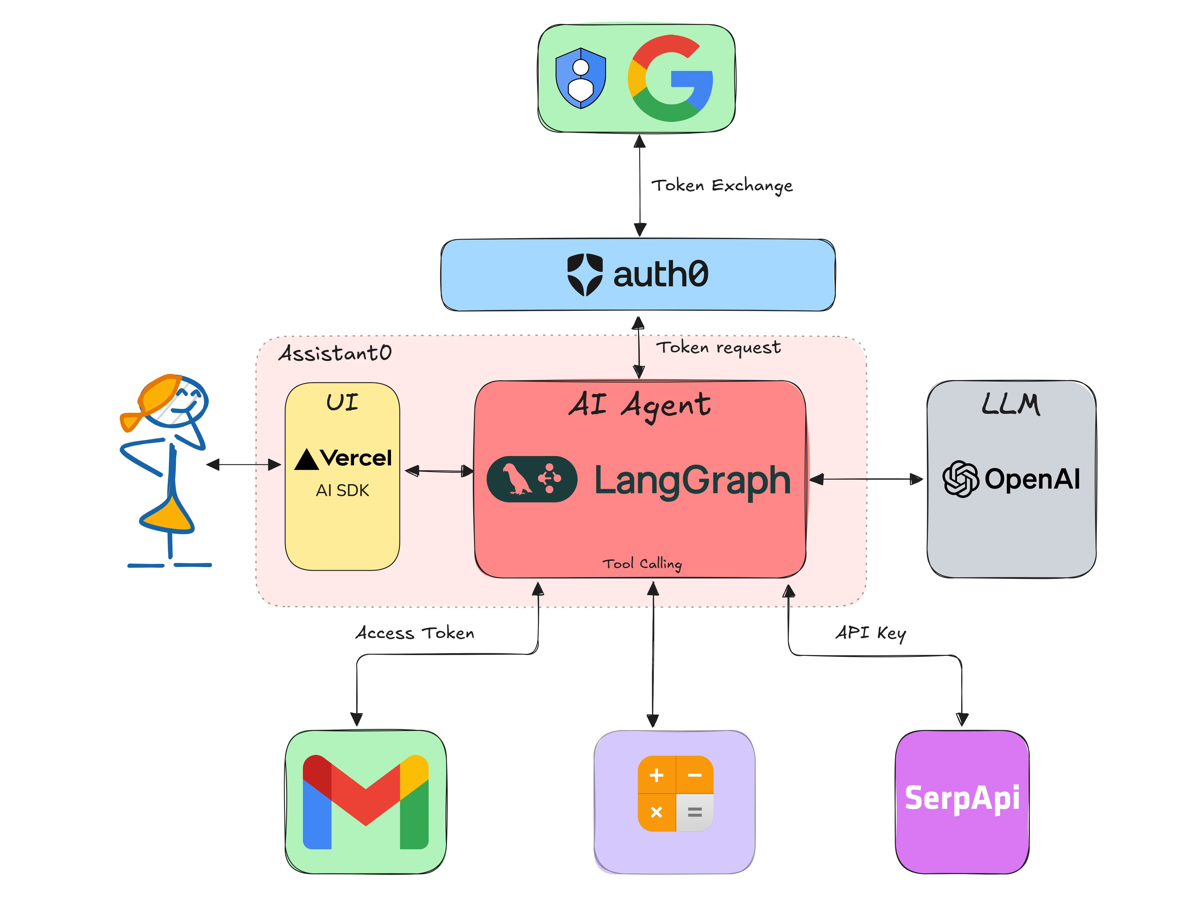
📸 How to build an AI Assistant with LangGraph and Next.js
What is LangGraph? — A State-Based AI Agent Workflow Framework
In 2026, the biggest challenge in AI agent development is "how to reliably implement complex workflows." Moving beyond simple chatbots, developers are increasingly turning to LangGraph to build autonomous agents that achieve goals through multiple steps.
Developed by the LangChain team, LangGraph models the execution flow of AI agents as a directed graph. Each node represents a task, while edges define conditional branching. This enables intuitive design and debugging of complex, multi-step agents.

📸 LangChain vs LangGraph: Which Framework Wins?
What Sets LangGraph Apart from Traditional LangChain Chains?
| Feature | Traditional LangChain Chain | LangGraph |
|---|---|---|
| Execution Flow | Linear | Graph-based (including loops) |
| State Management | Limited | Full state machine support |
| Iterative Processing | Challenging | Built-in support |
| Human Intervention | Requires complex implementation | Native Human-in-the-Loop support |
| Checkpoints | None | Save and restore execution state |
| Parallel Execution | Limited | Supports parallel nodes |
📸 Multi-Agent Chatbot with LangGraph | by Tobin Tom | Medium
Core Concepts of LangGraph

📸 LangGraph: Building Stateful AI Agents | by Kevinnjagi | Medium
1. State
A shared data structure accessible by all nodes. Defined using TypedDict or Pydantic models, each node can read and update the state.
from typing import TypedDict, Annotated, List
from langgraph.graph import add_messages

class AgentState(TypedDict):
    messages: Annotated[List, add_messages]  # Accumulate messages
    current_step: str
    result: str
    error: str
2. Node
A function that receives the state as input, processes it, and returns the updated state.
from langchain_anthropic import ChatAnthropic

llm = ChatAnthropic(model="claude-sonnet-4-6")

def research_node(state: AgentState) -> AgentState:
    """Node that performs web search and research"""
    response = llm.invoke(state["messages"])
    return {"messages": [response], "current_step": "research_done"}

def write_node(state: AgentState) -> AgentState:
    """Node that writes content based on research"""
    prompt = f"Write a blog draft based on the following research: {state['messages'][-1].content}"
    response = llm.invoke([{"role": "user", "content": prompt}])
    return {"messages": [response], "current_step": "writing_done"}

def review_node(state: AgentState) -> AgentState:
    """Node that reviews the content and suggests improvements"""
    prompt = f"Review the following article and identify improvements: {state['messages'][-1].content}"
    response = llm.invoke([{"role": "user", "content": prompt}])
    return {"messages": [response], "current_step": "review_done"}
3. Edge and Conditional Routing
def route_after_review(state: AgentState) -> str:
    """Determine the next step based on the review result"""
    last_message = state["messages"][-1].content

    if "improvement needed" in last_message:
        return "write"  # Rewrite
    else:
        return "publish"  # Publish
Hands-On Example: Automated Blog Writing Agent
Complete Graph Setup
from langgraph.graph import StateGraph, END
from langgraph.checkpoint.memory import MemorySaver

# Create the workflow graph
workflow = StateGraph(AgentState)

# Add nodes
workflow.add_node("research", research_node)
workflow.add_node("write", write_node)
workflow.add_node("review", review_node)

# Set entry point
workflow.set_entry_point("research")

# Define edges
workflow.add_edge("research", "write")
workflow.add_edge("write", "review")

# Conditional routing after review
workflow.add_conditional_edges(
    "review",
    route_after_review,
    {
        "write": "write",    # Rewriting needed
        "publish": END       # End workflow
    }
)

# Enable state persistence with checkpointing
checkpointer = MemorySaver()
app = workflow.compile(checkpointer=checkpointer)

# Execute the workflow
config = {"configurable": {"thread_id": "blog-post-1"}}
result = app.invoke(
    {"messages": [{"role": "user", "content": "Research the topic of DeepSeek V4 for a blog post"}]},
    config=config
)
Advanced Features in LangGraph
Human-in-the-Loop
LangGraph allows agents to request human approval before critical decisions. Use the interrupt_before parameter to pause before specified nodes.
# Pause before publishing to wait for human approval
app = workflow.compile(
    checkpointer=checkpointer,
    interrupt_before=["publish"]  # Pause before executing the publish node
)

# Run agent (will stop just before publishing)
result = app.invoke(initial_state, config)

# Resume after human confirmation
user_input = input("Publish the post? (yes/no): ")
if user_input == "yes":
    app.invoke(None, config)  # Resume from interruption
Parallel Execution
Speed up workflows by running multiple tasks simultaneously. For example, perform parallel keyword searches:
from langgraph.graph import Send

def parallel_research(state: AgentState) -> List[Send]:
    """Perform parallel searches for multiple keywords"""
    keywords = ["DeepSeek V4", "WebLLM", "LangGraph 2026"]
    return [Send("search_node", {"keyword": kw}) for kw in keywords]

# Fan-out and fan-in pattern
workflow.add_conditional_edges("start", parallel_research)
Checkpoints and State Restoration
If execution fails, LangGraph can restore from the last checkpoint. This is critical for reliably managing long-running workflows.
LangGraph vs. Competing Frameworks
LangGraph vs CrewAI
- LangGraph: Fine-grained control, highly customizable, steeper learning curve
- CrewAI: Role-based agents, easier setup, faster onboarding
LangGraph vs Microsoft AutoGen
- LangGraph: Supports Python/JavaScript, more flexible architecture
- AutoGen: Tightly integrates with Microsoft ecosystem, supports .NET
When Should You Choose LangGraph?
- When you need complex, multi-step workflows
- For agents with conditional branching or loops
- In production environments requiring human oversight
- Managing long-running tasks with reliable state persistence
- Integrating with existing LangChain-based code
LangGraph Roadmap for 2026
The LangGraph team is preparing several exciting updates for 2026:
- LangGraph Studio: Visual graph editor with real-time execution monitoring
- Distributed Checkpointing: Persistent state storage backed by Redis and PostgreSQL
- Enhanced Streaming: Real-time transmission of node execution status to clients
- Multi-Agent Orchestration: Standardizing collaboration patterns between independent agents
Conclusion: The Standard Framework for the Agentic AI Era
LangGraph is the essential tool for moving beyond simple chatbots to building AI agents capable of autonomously handling complex tasks. Its combination of graph-based workflows, state management, human-in-the-loop support, and checkpointing provides the foundation for reliable, production-grade agent systems.
As LangGraph becomes the de facto standard for agentic AI development in 2026, now is the perfect time to start mastering it.
댓글
댓글 쓰기