
📸 The New Era of React: Exploring React 19
Why You Must Learn React 19 in 2026
Since its official release in December 2024, React 19 has become the standard in most production projects by 2026. Combined with Next.js 15, it has redefined full-stack web development. This guide breaks down React 19’s core changes with real-world code examples. If you’re still on React 18, you’ll find plenty of compelling reasons to upgrade immediately.
📸 Mastering React 19: Exploring the Latest Features of the New ...
Key Change 1 — Actions: A Complete Redesign of Form Handling

📸 Unlocking the Power of React 19
The Problem with the Old Approach
Up to React 18, handling pending states, errors, and optimistic updates during form submission required manual management:
// React 18 approach (inefficient)
function UpdateName() {
  const [name, setName] = useState("");
  const [error, setError] = useState(null);
  const [isPending, setIsPending] = useState(false);

  const handleSubmit = async () => {
    setIsPending(true);
    const error = await updateName(name);
    setIsPending(false);
    if (error) {
      setError(error);
      return;
    }
    redirect("/path");
  };
  // ... (repeated boilerplate code)
}
📸 React 19 Actions Preview
React 19 Actions
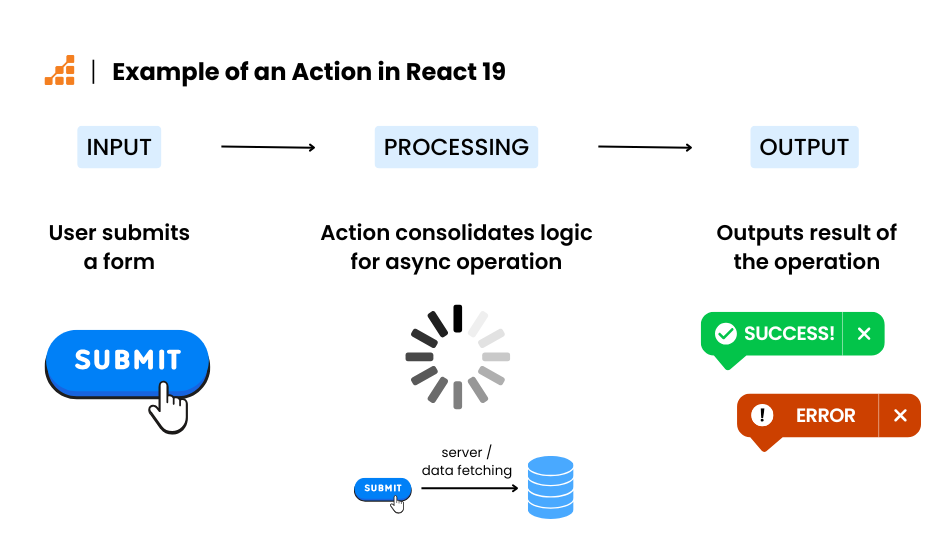
React 19 introduces the Actions concept. Asynchronous transition functions are now called "Actions" and automatically manage pending states, error handling, and optimistic updates:
// React 19 approach — much cleaner
function UpdateName() {
  const [name, setName] = useState("");
  const [error, setError] = useState(null);
  const [isPending, startTransition] = useTransition();

  const handleSubmit = () => {
    startTransition(async () => {
      const error = await updateName(name);
      if (error) {
        setError(error);
        return;
      }
      redirect("/path");
    });
  };
}
Async transitions automatically set isPending to true when a request starts and back to false when it finishes, ensuring the UI remains responsive during data updates.
Key Change 2 — useActionState: Unified Hook for Form Actions
A new hook, useActionState, handles common form submission patterns:
import { useActionState } from "react";

async function submitForm(prevState, formData) {
  const name = formData.get("name");
  const result = await updateUserName(name);
  if (result.error) return { error: result.error };
  return { success: true };
}

function NameForm() {
  const [state, action, isPending] = useActionState(submitForm, { error: null });

  return (
    <form action={action}>
      <input name="name" />
      <button disabled={isPending}>
        {isPending ? "Saving..." : "Save"}
      </button>
      {state.error && <p className="error">{state.error}</p>}
    </form>
  );
}
useActionState returns three values: the current state, an action function to attach to the form, and an isPending boolean. It integrates seamlessly with server-side rendering.
Key Change 3 — useOptimistic: Instant UI Feedback
Optimistic updates—updating the UI before a server response—are now officially supported via the useOptimistic hook:
import { useOptimistic, useTransition } from "react";

function MessageList({ messages, onSend }) {
  const [optimisticMessages, addOptimistic] = useOptimistic(
    messages,
    (state, newMessage) => [...state, { text: newMessage, sending: true }]
  );
  const [isPending, startTransition] = useTransition();

  const send = (text) => {
    startTransition(async () => {
      addOptimistic(text); // Immediate UI update
      await onSend(text);  // Actual server request
    });
  };

  return (
    <ul>
      {optimisticMessages.map((msg, i) => (
        <li key={i} style={{ opacity: msg.sending ? 0.6 : 1 }}>
          {msg.text}
          {msg.sending && " (sending...)"}
        </li>
      ))}
    </ul>
  );
}
If the server request fails, the optimistic state automatically rolls back. This hook is essential for building responsive features like chat, likes, and bookmarks.
Key Change 4 — Server Components (Now the Default)
The biggest paradigm shift in React 19 is that Server Components are now the default. Components that used to run only on the client can now execute on the server.
// Server Component (default — no special directive needed)
async function ProductList() {
  // Direct DB access on server — no API layer required
  const products = await db.query("SELECT * FROM products LIMIT 10");

  return (
    <ul>
      {products.map(p => <ProductCard key={p.id} product={p} />)}
    </ul>
  );
}

// Client Component — explicitly marked for interactivity
"use client";
function AddToCartButton({ productId }) {
  const [added, setAdded] = useState(false);
  return (
    <button onClick={() => setAdded(true)}>
      {added ? "Added to cart ✓" : "Add to cart"}
    </button>
  );
}
Advantages of Server Components
- Smaller bundle size: Server component code never reaches the client
- Direct database access: Query data directly from the server without an API layer
- Better SEO: Full HTML is rendered server-side
- Automatic code splitting: Built-in optimization at client/server boundaries
Key Change 5 — use() Hook: Unified Handling of Promises and Context
The new use() hook allows direct consumption of Promises and Context during component rendering:
import { use, Suspense } from "react";

// Direct Promise usage
function UserProfile({ userPromise }) {
  const user = use(userPromise); // Works with Suspense
  return <div>{user.name}</div>;
}

// Context can also be used with use() (supports conditional calls!)
function ThemeButton({ condition }) {
  if (condition) {
    const theme = use(ThemeContext); // Conditional use — breaks traditional rule
    return <button style={{ color: theme.color }}>Button</button>;
  }
  return <button>Default Button</button>;
}

// Usage example
function App() {
  const userPromise = fetchUser(userId);
  return (
    <Suspense fallback={<div>Loading...</div>}>
      <UserProfile userPromise={userPromise} />
    </Suspense>
  );
}
The key advantage of use() is that it breaks the traditional React Hooks rules: it can be called inside conditions, loops, or anywhere you need it—offering unprecedented flexibility for complex component logic.
Key Change 6 — Document Metadata API
React 19 now supports direct management of <title>, <meta>, and <link> tags inside components. External libraries like react-helmet are no longer needed:
function BlogPost({ post }) {
  return (
    <article>
      {/* Automatically hoisted to <head> */}
      <title>{post.title}</title>
      <meta name="description" content={post.summary} />
      <meta property="og:image" content={post.thumbnail} />
      <link rel="canonical" href={post.url} />

      <h1>{post.title}</h1>
      <p>{post.content}</p>
    </article>
  );
}
React 18 → 19 Migration Checklist
Major Breaking Changes
ReactDOM.renderfully removed →createRootis now requiredactfromreact-dom/test-utils→ import directly fromreact- Legacy Context API (childContextTypes) removed
defaultPropsin functional components deprecated → use ES default parametersstring refcompletely removed → useuseRef
Migration Commands
# npm
npm install react@19 react-dom@19

# yarn
yarn add react@19 react-dom@19

# Automatic migration via codemod
npx codemod@latest react/19/migration-recipe
Practical React 19 Tips for 2026
React 19's features shine brightest when combined. For example, loading initial data with Server Components, providing instant feedback with useOptimistic, and handling form submissions with useActionState represents the most modern React architecture today.
AI-powered coding tools like Claude Code and GitHub Copilot are now optimized for React 19 patterns, significantly reducing boilerplate. In particular, the combination of useActionState and Server Actions has become the new full-stack standard in Next.js 15 projects.
Summary — Core Changes in React 19
- Actions + useTransition: Automate async form handling
- useActionState: Unified state management for form actions
- useOptimistic: Standardized optimistic UI updates
- Server Components: Now default — simplifies API layers
- use() hook: Unified Promise/Context handling with conditional calls
- Document Metadata: Built-in <head> management
댓글
댓글 쓰기