The Ultimate On-Device AI Guide 2026 - Using Apple Intelligence, Qualcomm NPU, and Local LLMs to Leverage AI While Protecting Privacy

📸 Amazon.com: Funny Silly AI Apple gen z Meme BrainRot Humor ...
Why On-Device AI Now?
The idea that the era of cloud AI is fading might sound exaggerated. But in 2026, Apple Intelligence has become standard on iPhone 16, and Qualcomm Snapdragon X Elite’s 45 TOPS NPU is now built into most flagship laptops—changing the narrative. The age of on-device AI has officially arrived: AI that runs locally on your device, without internet connectivity or sending your data to remote servers.
📸 Apple Intelligence is coming. Here's what it means for your ...
🤖 What Is On-Device AI?
On-device AI refers to AI models that perform inference directly on users’ devices—such as smartphones, laptops, and edge devices—instead of relying on remote cloud servers. This is fundamentally different from cloud AI models like ChatGPT or Gemini Ultra, which require sending queries over the internet.

📸 Does Apple’s AI Suck? 16 Pro vs S25 Ultra with Galaxy AI BATTLE!
Cloud AI vs On-Device AI Comparison
| Feature | Cloud AI | On-Device AI |
|---|---|---|
| Internet Required | ✅ Required | ❌ Not Needed |
| Response Speed | Network latency involved | Ultra-low latency (milliseconds) |
| Privacy | Data sent to servers | Processed locally on device |
| Cost | Pay-per-usage | One-time hardware cost |
| Model Size | Trillions of parameters possible | 1B–13B parameters practical |
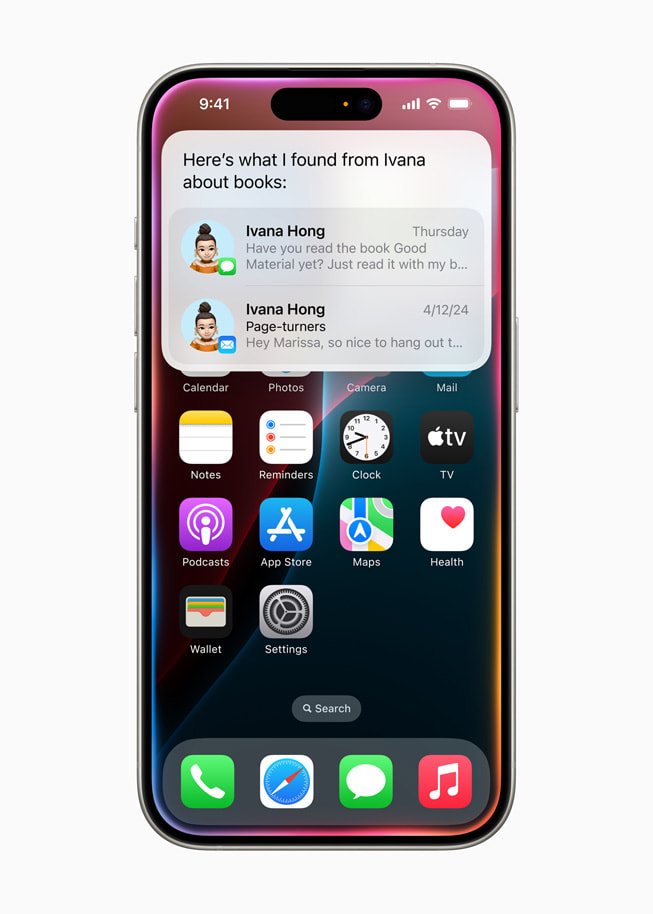
📸 Introducing Apple Intelligence for iPhone, iPad, and Mac - Apple
🍎 1. Apple Intelligence — The Built-in AI Engine for iOS & macOS
Apple Intelligence is an on-device AI platform pre-installed on iPhone 16 series and Macs with M1 or later chips. As of 2026, it supports 25 languages—including Korean—and enables offline access to features like image generation, writing assistance, and smart summarization.
Key Apple Intelligence Features (2026)
- Writing Tools: Select text in emails or notes, then right-click to instantly summarize, correct, or rewrite
- Image Playground: Generate images directly from text prompts—no internet needed
- Priority Messages: AI automatically surfaces important emails to the top of your inbox
- Siri Integration: Understands cross-app context. Try complex commands like, "Find last summer’s beach photos in Photos and send them via Message"
- Private Cloud Compute: Complex queries are processed on Apple's dedicated servers with zero data retention, maintaining user privacy
How to Enable
Settings → Apple Intelligence & Siri → Turn on Apple Intelligence (Requires iOS 18.4+, Korean language support enabled)
💻 2. Qualcomm NPU & Copilot+ PC — Windows’ On-Device AI Revolution
Microsoft’s Copilot+ PC category includes devices powered by Qualcomm Snapdragon X Elite / Plus chips, featuring at least 45 TOPS (trillion operations per second) of NPU performance. By 2026, Intel Core Ultra 300 and AMD Ryzen AI 400 series also meet this threshold.
On-Device AI Features on Copilot+ PC
- Recall: Search your past screen activity using natural language. Find “last week’s Python tutorial” instantly — processed locally
- Cocreator: Turn a sketch in Paint into a full artwork using AI in real time
- Live Captions: Real-time subtitle translation (e.g., English to Korean) — works offline
- Enhanced Windows Hello: Facial recognition speed improved by 30%
🦙 3. Local LLM — Running AI on Your PC with Ollama
Ollama is a tool that lets you run open-source large language models on macOS, Windows, and Linux with a single command. In 2026, high-performance lightweight models like Meta’s Llama 4 Scout (17B), Google’s Gemma 3 (4B, 12B), and Microsoft’s Phi-4 (14B) have made local AI quality nearly indistinguishable from cloud-based alternatives.
Quick Start with Ollama (M1/M2/M3 Mac)
# Install
brew install ollama

# Download and run Llama 4 Scout 17B (requires 10GB free space)
ollama run llama4:scout

# Gemma 3 4B (lightweight, fast responses)
ollama run gemma3:4b
Recommended Local LLMs (2026 Edition)
- Speed First: Gemma 3 4B, Phi-4 mini (requires 4GB+ RAM)
- Balanced: Llama 4 Scout 17B (16GB+ RAM)
- Top Quality: Llama 4 Maverick 70B (64GB RAM, high-end Mac)
- Coding Specialist: Qwen2.5-Coder 32B (32GB RAM)
On an M4 MacBook Pro (36GB), the Scout 17B model processes ~40 tokens per second—virtually on par with Claude Haiku in real-world speed.
🔒 4. Privacy Benefits — Why Professionals in Healthcare, Law, and Enterprise Are Adopting On-Device AI
On-device AI is gaining traction in fields that handle sensitive data, where privacy is paramount.
- ⚕️ Healthcare: Summarize patient records using AI—without ever sending data to external APIs
- ⚖️ Legal: Analyze confidential contracts locally with zero risk of data leaks
- 🏢 Enterprise: Use AI productivity tools in tightly secured internal environments
- 👤 Personal: Keep diaries, health logs, and private information fully protected when interacting with AI
According to SilverScoop Blog (2026), adoption of local LLMs among enterprises has surged by 340% year-on-year in 2026—driven by tightening data privacy regulations like GDPR and Korea’s Personal Information Protection Act.
🚀 The State of the On-Device AI Ecosystem (2026)
As noted by Meta AI researcher Vikas Chandra, ExecuTorch runtime now supports devices from microcontrollers to high-end smartphones with just a 50KB base footprint and compatibility across over 12 hardware backends—including Apple, Qualcomm, ARM, and MediaTek. Over 80% of popular edge LLMs on HuggingFace run out-of-the-box without additional configuration.
Wrapping Up — The Age of AI That Processes Your Data on Your Device
On-device AI isn’t just a tech trend—it’s a paradigm shift that overcomes the limitations of cloud AI across four critical dimensions: privacy, speed, cost, and offline usability. Start experimenting with Apple Intelligence on your iPhone, and if you have the hardware, install Gemma 3 or Llama 4 locally via Ollama. This is the moment you truly bring AI into your own hands—literally.
댓글
댓글 쓰기