
📸 Beyond Pain - Rethinking Persistent Pain in Inverclyde ...
The Persistent Pain of Initial Page Load
Alright team, let's be real for a sec. We've all been there: meticulously optimizing our web apps, splitting bundles, code-splitting components with dynamic import(), and still, that initial page load feels like it's dragging its feet through treacle. The network waterfall might look clean, but the browser's main thread is chugging away, parsing and executing JavaScript that, frankly, isn't critical for the immediate user experience.
You see, traditional lazy loading with import() is fantastic for modules that are truly optional – think modals, admin panels, or features only accessible after user interaction. But what about those modules you know you'll need, just not right this second? The ones that are always part of the initial bundle but don't need to fire up their engines until a specific condition is met, or an event triggers? That's where we've often been stuck between a rock and a hard place.
Well, good news, folks! TypeScript 5.9, which dropped on August 1st, 2024, brings a fascinating new tool to our performance toolkit: the import defer syntax. This isn't just another flavor of lazy loading; it's a more nuanced approach to module evaluation that can significantly improve your application's Time To Interactive (TTI) and First Input Delay (FID) without requiring dramatic architectural shifts. Let's dive in and see why this matters beyond just another version bump.
📸 Lazy is the new fast: How Lazy Imports and Cinder accelerate ...
What's the Big Deal with import defer?
To understand import defer, let's quickly recap how module imports typically work in JavaScript (and by extension, TypeScript):
- Static
import(import { x } from 'module';): This is your standard, run-of-the-mill import. The module is loaded, parsed, and evaluated immediately when the containing module is loaded. It's synchronous and blocking. If that module has side effects or heavy initialization, it happens right away, potentially delaying your app's startup. - Dynamic
import()(import('module').then(...)): This is our beloved lazy loading. The module's code is fetched and evaluated only when theimport()function is called. It returns a Promise, making it asynchronous and non-blocking. Crucially, it often leads to a separate network request and a new chunk in your bundle.
Now, enter import defer. This new syntax, part of an ECMAScript proposal that TypeScript 5.9 now supports, offers a crucial middle ground. With import defer, the module is still loaded and parsed as part of your initial bundle (no new network requests!), but its code is not evaluated until one of its exported members is actually accessed. Think of it as putting the module's engine in neutral until you hit the gas pedal. The fuel (code) is in the tank, but it's not burning until you need it.
This might sound subtle, but it's a game-changer for scenarios where you need certain functionalities available, but don't want their initialization cost to impact your critical rendering path. It's about deferring CPU work, not necessarily network requests.

📸 Most performance problems aren't caused by lazy people. They ...
The Performance Problem defer Solves
So, which specific headaches does import defer alleviate? Let's consider a few common scenarios:
- Heavy Utility Libraries: Imagine a complex date formatting library, a robust mathematical computation suite, or a sophisticated markdown parser. You might import it at the top of a file, but its functions aren't called until a user interacts with a specific part of your UI, perhaps a date picker or a rich text editor. Without
defer, that entire library gets evaluated on initial load, even if its functions sit idle for seconds. - Complex UI Components (non-critical): You might have a fancy charting library or a sophisticated data grid component that's always rendered on a dashboard, but only initialized with data when a tab is clicked or an API call returns. If the component's internal logic or dependencies are heavy, deferring its module evaluation can make a big difference.
- Large Configuration Objects or Data: Sometimes, you import a module just to get a massive JSON configuration object or a lookup table. While the data itself is static, the module might have some processing or validation logic that runs on evaluation. Deferring this can save precious milliseconds.
In all these cases, the module is needed eventually, and you don't necessarily want the network overhead or the promise-based complexity of a dynamic import(). You just want to push its execution cost further down the timeline, past the point where the user perceives your app as 'ready'. This reduces main thread blocking time, making your application feel snappier and more responsive right from the start.
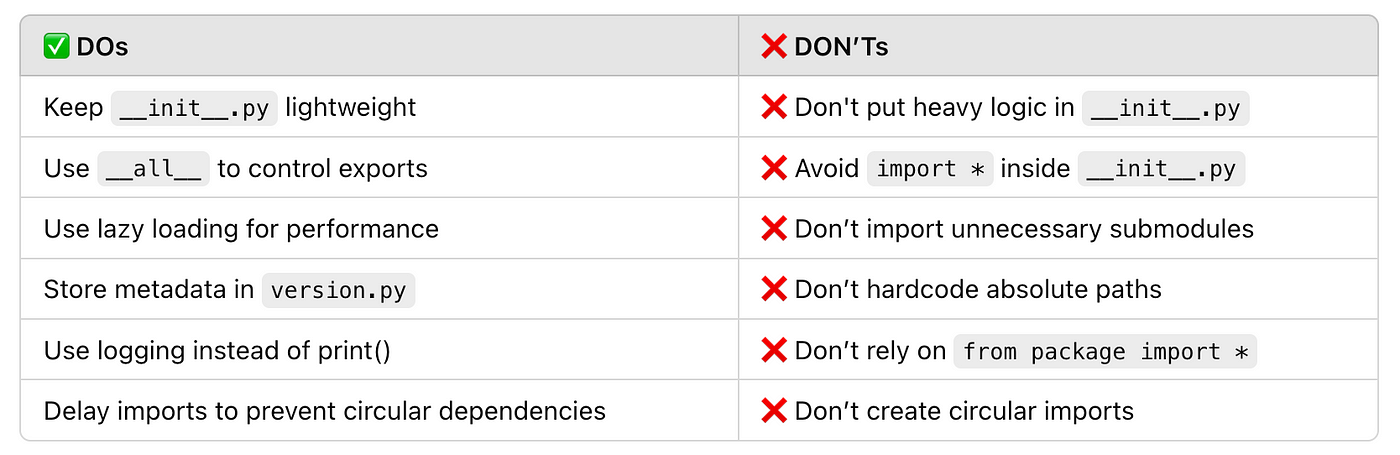
📸 Mastering __init__.py in Python: A Complete Guide to Imports ...
import defer in Action: Practical Examples
Let's look at how this actually works in code. Suppose we have a hypothetical heavy-math.ts module:
// heavy-math.ts\nconst initializeHeavyMathLibrary = () => {\n console.log('Initializing heavy math library...');\n // Simulate some expensive setup\n let sum = 0;\n for (let i = 0; i < 1_000_000_000; i++) {\n sum += i;\n }\n console.log('Heavy math library initialized. Sum:', sum);\n return { sum };\n};\n\nconst heavyMathInstance = initializeHeavyMathLibrary();\n\nexport const calculateHypotenuse = (a: number, b: number): number => {\n console.log('Calculating hypotenuse...');\n return Math.sqrt(a * a + b * b);\n};\n\nexport const calculateComplexIntegral = (fn: (x: number) => number, lower: number, upper: number): number => {\n console.log('Calculating complex integral...');\n // ... very complex integral calculation ...\n return 42.0;\n};\nNotice the initializeHeavyMathLibrary() call and the loop. This simulates a module that does significant work on evaluation. Now, in our main application file:
// app.ts\n\n// 1. Traditional eager import (module evaluates immediately)\n// import { calculateHypotenuse } from './heavy-math';\n// console.log('App started. Hypotenuse:', calculateHypotenuse(3, 4)); // 'Initializing...' logs immediately\n\n// 2. Dynamic import (module evaluates when promise resolves)\n// document.getElementById('calcBtn')?.addEventListener('click', async () => {\n// console.log('Clicked calculate button. Dynamically importing...');\n// const { calculateHypotenuse } = await import('./heavy-math'); // 'Initializing...' logs here\n// console.log('Hypotenuse:', calculateHypotenuse(5, 12));\n// });\n\n// 3. The new `import defer` syntax\nimport { calculateHypotenuse, calculateComplexIntegral } from './heavy-math' defer;\n\nconsole.log('Application has started, but heavy-math is deferred.');\n\ndocument.getElementById('hypotenuseBtn')?.addEventListener('click', () => {\n console.log('Clicked hypotenuse button. Accessing deferred module...');\n const result = calculateHypotenuse(6, 8); // 'Initializing...' logs *here*\n console.log('Hypotenuse result:', result);\n});\n\ndocument.getElementById('integralBtn')?.addEventListener('click', () => {\n console.log('Clicked integral button. Accessing another deferred member...');\n const result = calculateComplexIntegral(x => x * x, 0, 1); // If not already evaluated, 'Initializing...' logs *here*\n console.log('Integral result:', result);\n});\n\n// Imagine other, lightweight initial UI rendering happens here\n// ...\n\nWhen you run the import defer example, you'll see \"Application has started, but heavy-math is deferred.\" logged immediately. Crucially, \"Initializing heavy math library...\" won't appear until you click one of the buttons that accesses calculateHypotenuse or calculateComplexIntegral. This means your application's initial startup isn't bogged down by the expensive initialization of heavy-math.ts. The module's code is already loaded and parsed, but its execution is put on hold until explicitly needed.
import defer vs. Dynamic import(): Choose Your Weapon Wisely
This is where things get interesting, and where understanding the distinction is key. Both import defer and dynamic import() are about optimizing performance, but they tackle different problems:
- Dynamic
import(): This is primarily for code splitting and network deferral. When you useimport(), the module (and its dependencies) are often bundled into a separate JavaScript chunk. This chunk isn't downloaded until theimport()call is made, reducing your initial bundle size and network load. The module is also evaluated only after it's fetched. Use this when the module is truly optional, and you want to avoid downloading its code altogether until it's needed. import defer: This is for evaluation deferral. The module is still part of your initial bundle (meaning it's downloaded with the rest of your main application code). However, its code execution, including any top-level side effects or variable initializations, is delayed until one of its exports is first accessed. Use this when the module is always required eventually, but its initial execution cost is high and can be postponed without impacting the critical rendering path. It's about shifting CPU work, not necessarily network work.
Think of it like this: import() is like saying, \"Don't even bother loading this entire side quest until the player explicitly asks for it.\" import defer is like saying, \"Okay, load the side quest map and assets, but don't start the actual quest logic until the player walks into the quest giver's house.\"
You'll still want to reach for import() for truly large, optional features. But for those 'always present but not immediately critical' modules, import defer is a more elegant and less intrusive solution.
What I Actually Think About This
Honestly, when I first heard about import defer, my immediate thought was, \"Finally!\" This isn't a revolutionary concept in the grand scheme of things – we've been doing similar tricks manually with factory functions or wrapping modules in closures for ages. But having it as a native language construct, directly supported by TypeScript 5.9 and integrated into the module system, is a huge win for developer ergonomics and clarity. It formalizes a common optimization pattern.
I don't think this is a silver bullet that will magically fix all your performance woes. Your initial bundle size still matters, and aggressive code splitting with import() will remain crucial for many applications. However, import defer gives us a finer-grained control over the execution phase of modules that are part of the initial load.
Here's how I'd actually use this:
- Heavy-duty calculation libraries: Math, cryptography,
댓글
댓글 쓰기