Bun Complete Guide 2026 — Ultra-Fast JavaScript Runtime Beyond Node.js All-in-One Toolkit Practical Guide

📸 What is Bun? A Fast Runtime Node.js Alternative | Scalable Path
What is Bun? — A Game-Changer in the JavaScript Ecosystem
It's been 15 years since Node.js reigned as the standard for JavaScript server-side runtime. Now, Bun has thrown down the gauntlet to challenge that throne. Developed by Oven, Bun is more than just a runtime—it's an all-in-one JavaScript toolkit that integrates package manager + bundler + test runner + runtime into one unified solution. Let's dive deep into why so many teams are switching from Node.js to Bun in 2026.

📸 Bun 1.0 Ships as Node.js and Deno Alternative - The New Stack
Bun's Core Differentiators — Why Is It So Fast?

📸 Understanding the Core Architectures of Node.js, Bun, and Deno
JavaScriptCore Engine
Instead of the V8 engine used by Node.js and Chrome, Bun adopts Apple Safari's JavaScriptCore (JSC) engine. JSC particularly dominates V8 in fast startup time (Cold Start). The performance difference is dramatic in serverless functions, CLI tools, and short-running scripts.
📸 Is Bun so fast because of Zig?. Bun, a modern JavaScript ...
Written in Zig Language
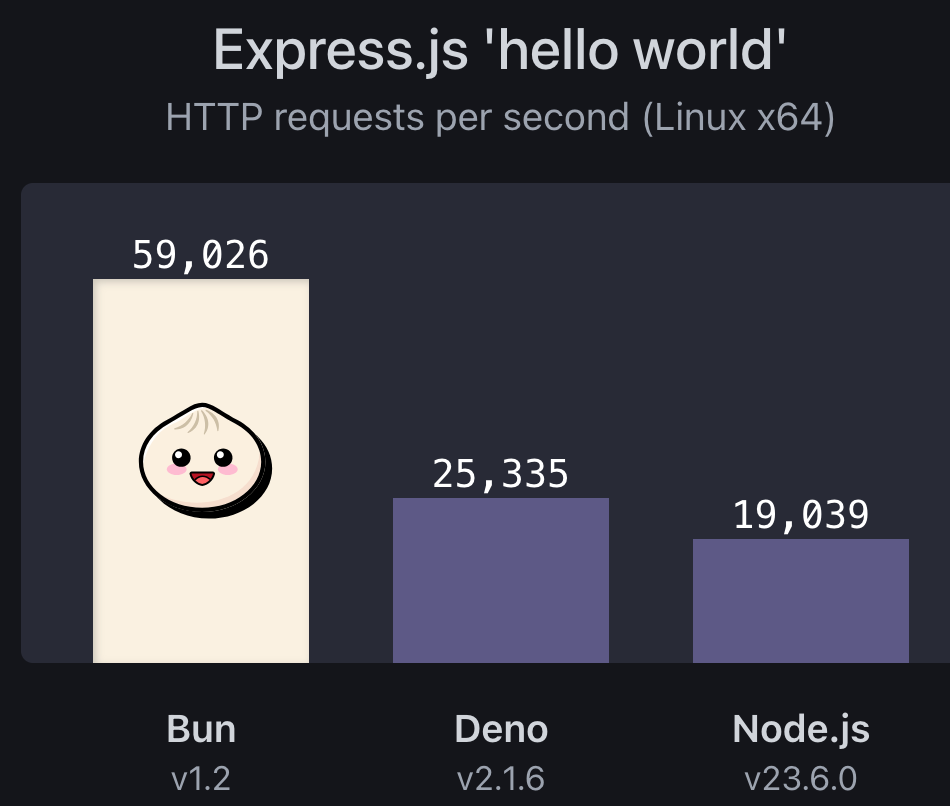
The runtime core is written in Zig, providing extremely optimized memory management and system-level performance. It records performance up to 4 times faster than Node.js in I/O-intensive tasks and HTTP server throughput.
Performance Benchmarks — Node.js vs Bun
Let's verify Bun's performance superiority with actual benchmark numbers:
- HTTP Throughput: Approximately 4x higher throughput than Node.js
- Package Installation Speed:
bun installup to 30x faster than npm - Startup Time (Cold Start): About 4-5x faster than Node.js
- CPU-Intensive Tasks: Completion time reduced by approximately 2x
- Test Execution:
bun testabout 10-20x faster than Jest
As many developers in the Reddit community agree, Bun's speed advantage is felt throughout the entire development loop (install → test → build → run), not just in the runtime.
All-in-One Toolkit — Solve Everything with One Tool
bun install — Lightning-Fast Package Manager
bun install, which replaces existing npm/yarn/pnpm, boasts dramatic speed with binary lock files (bun.lockb) and aggressive caching. You can use your existing package.json as-is, keeping migration costs low.
# Install dependencies (replaces npm install)
bun install

# Add packages
bun add express typescript

# Global packages
bun add -g typescript
bun run — Script Executor
You can run TypeScript files directly without separate transpilation. The same applies to TSX and JSX. No more need for tools like ts-node or tsx.
# Run TypeScript directly
bun run index.ts

# Run package.json scripts
bun run dev
bun run build
bun test — Fast Test Runner
An built-in test runner that uses Jest-compatible syntax while being much faster than Jest. Ready to use immediately without configuration files.
import { expect, test } from "bun:test";

test("Verify addition works correctly", () => {
  expect(2 + 2).toBe(4);
});

test("String processing test", () => {
  expect("Bun".toLowerCase()).toBe("bun");
});
bun build — Built-in Bundler
A built-in bundler that replaces Webpack and esbuild. Implemented based on esbuild, making it extremely fast.
# Bundle for browser
bun build ./index.tsx --outdir ./dist --target browser

# Bundle for Node.js
bun build ./server.ts --outdir ./dist --target node
Node.js Compatibility — Why Migration Is Easy
One of Bun's biggest advantages is its high compatibility with Node.js. Most Node.js code runs in Bun without modification:
- Full npm package ecosystem compatibility
- Support for Node.js standard modules (
fs,path,http, etc.) - Both CommonJS (
require) and ES Modules (import) supported - Compatible with existing web frameworks like Express, Fastify, etc.
However, some native Node.js modules (Native Addons) may not be fully supported yet, so we recommend thorough testing in a staging environment before production deployment.
Bun HTTP Server — Build Ultra-Fast Servers with Built-in API
Bun can implement fast HTTP servers with built-in APIs without Express:
const server = Bun.serve({
  port: 3000,
  fetch(request) {
    const url = new URL(request.url);

    if (url.pathname === "/") {
      return new Response("Hello, Bun server! 🚀");
    }

    if (url.pathname === "/api/hello") {
      return Response.json({
        message: "Bun API response",
        runtime: "Bun " + Bun.version
      });
    }

    return new Response("Not Found", { status: 404 });
  },
});

console.log(`Server running: http://localhost:${server.port}`);
Should You Use Bun in 2026?
Cases Where Bun Is Highly Recommended
- Starting a new project — Configure with Bun from the beginning
- Development servers/CLI tools — Fast startup time improves developer experience
- CI/CD pipelines where test speed is a bottleneck
- Scripts requiring native TypeScript execution
- Edge computing and serverless environments
Cases Where Node.js Should Be Maintained
- Legacy projects dependent on native Node.js addons
- Environments where long-term enterprise stability is the top priority
- When the team is fully leveraging Node.js expertise
As of 2026, Bun is being successfully used in many production environments. We recommend thorough verification in a staging environment before production migration.
Conclusion — A Paradigm Shift in JavaScript Runtime
Bun is not simply a "fast Node.js alternative." It presents a new paradigm for JavaScript development that integrates package manager, bundler, test runner, and runtime. Experience Bun now, which boosts speed at every stage from installation to build, test, and execution. You can get started with just one line: curl -fsSL https://bun.sh/install | bash
댓글
댓글 쓰기