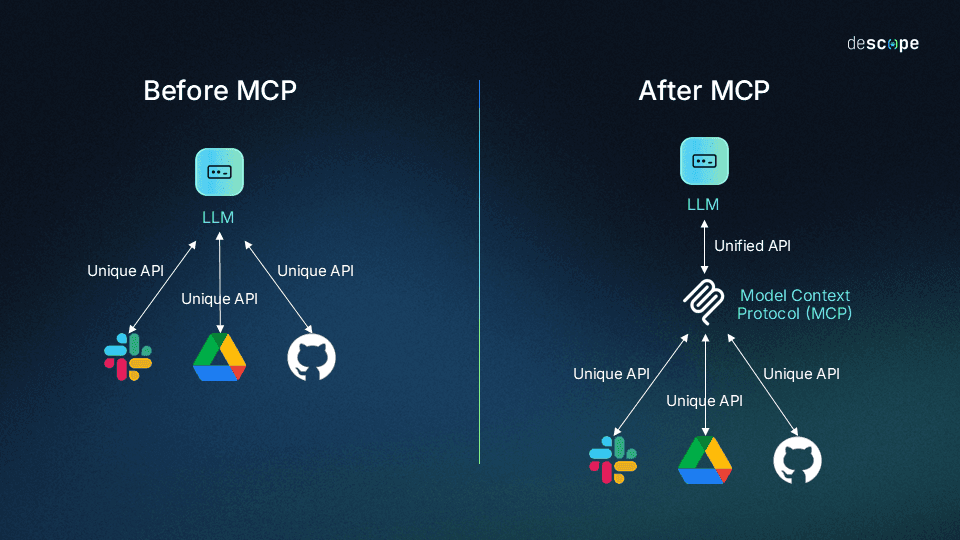
📸 What Is the Model Context Protocol (MCP) and How It Works
What Is MCP (Model Context Protocol)?
Launched by Anthropic in late 2025, MCP (Model Context Protocol) has established itself as the core standard for AI agent development in 2026. Tens of thousands of MCP servers have already been developed, and major AI companies including OpenAI, Google, and Microsoft have announced official support. By standardizing how AI models communicate with external tools, databases, and APIs, MCP replaces the custom integration layers that previously had to be built individually with a single common protocol.
.png)
📸 A practical introduction to the Model-Context-Protocol (MCP ...
Core Problems MCP Solves
Modern generative AI systems are not complete with model output alone. They need to read data from CRMs, code editors (IDEs), cloud APIs, and databases, then take action on those systems. Before MCP, each integration required writing custom SDK code, leading to skyrocketing maintenance costs and fragile system architectures.
MCP solves this problem with three core components:
- Host: Applications where AI runs, such as Claude Desktop, Cursor, VS Code
- Client: Middleware that maintains connections with servers within the Host
- Server: Lightweight services that provide specific functionality (DB queries, file access, API calls)
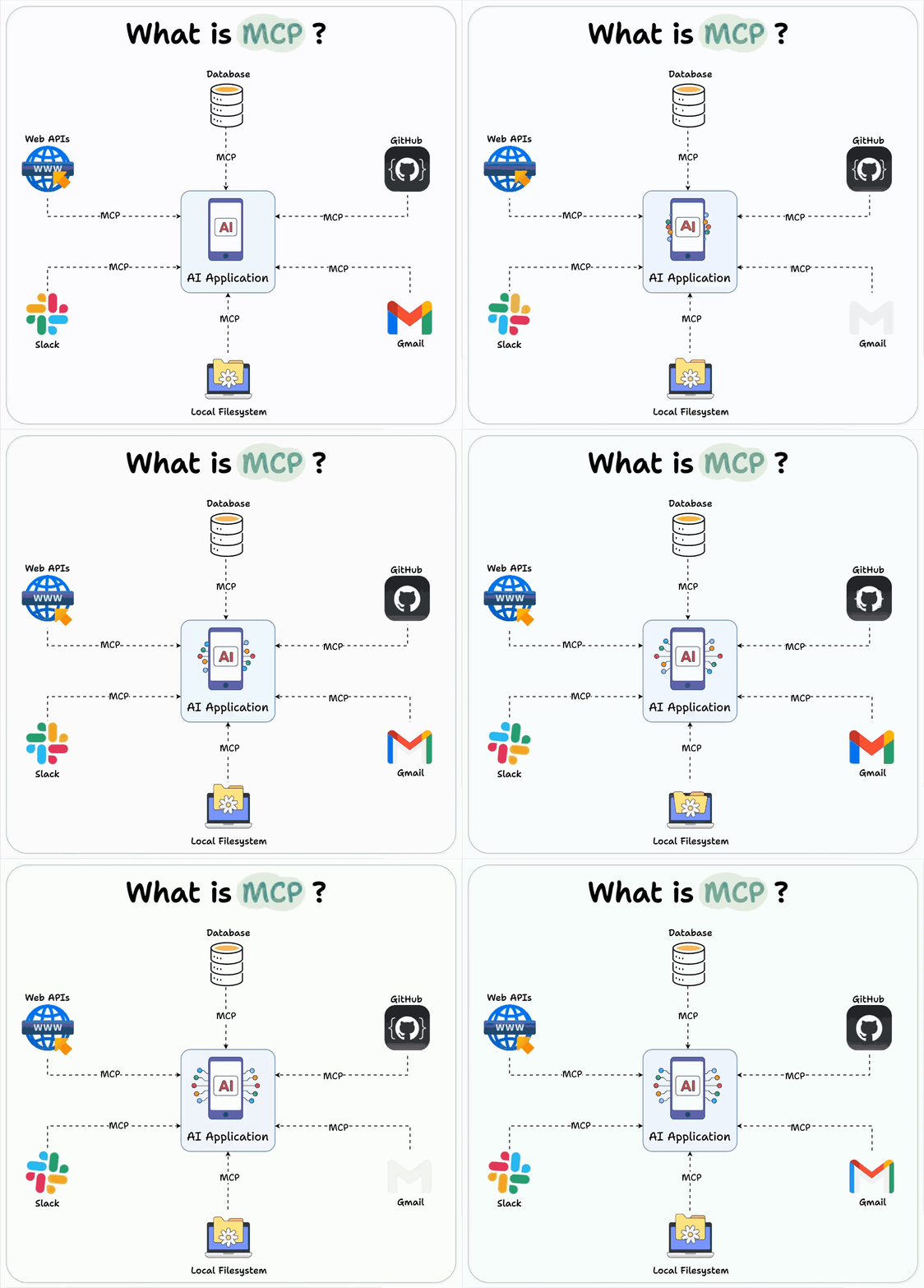
📸 Model Context Protocol (MCP): Integrating Azure OpenAI for ...
3 Core Features of MCP
📸 Model Context Protocol (MCP): a guide to unlock seamless AI ...
1. Tools — Actions Controlled by the Model
Tools are the primary means by which agents take action. Each Tool has a clear name, description, JSON Schema arguments, and predictable output format. For example, the Neo4j MCP server exposes tools like get-schema (graph schema lookup), read-cypher (read-only queries), and write-cypher (data writing). The model autonomously determines which Tool to call based on user requests.
2. Resources — Context Controlled by Applications
Resources provide the model with read-only context (file contents, DB views, dashboards, API responses). By exposing recent logs, user segment views, architecture documents, and more as Resources, the model can safely access context without broad read/write permissions.
3. Prompts — Workflow Templates Controlled by Users
Prompts are predefined templates that accept dynamic arguments, pull in Resources, and orchestrate multi-step interactions. By creating frequently used team patterns as Prompts, prompt engineering overhead is significantly reduced.
MCP Ecosystem Status in 2026
As of early 2026, the MCP ecosystem has grown explosively:
- Tens of thousands of MCP servers publicly deployed (GitHub, npm, PyPI)
- OAuth-based authentication included in the base specification
- Streamable HTTP transport for real-time streaming support
- Structured Tool output providing richer response formats
- Compliance Test Suite introduced to strengthen implementation standardization
Major supported tools:
- Claude Desktop / Claude API
- Cursor, Windsurf, VS Code (Copilot agents)
- LangChain, LangGraph, AutoGen
- Neo4j, PostgreSQL, Slack, GitHub official MCP servers
Building Your Own MCP Server — Python Example
Developing an MCP server is simpler than you might think. Here's the basic structure using the Python SDK:
from mcp import Server, Tool
import mcp.types as types

server = Server("my-data-server")

@server.list_tools()
async def list_tools():
    return [
        types.Tool(
            name="query_database",
            description="Query information from the database",
            inputSchema={
                "type": "object",
                "properties": {
                    "query": {"type": "string", "description": "SQL query"}
                },
                "required": ["query"]
            }
        )
    ]

@server.call_tool()
async def call_tool(name: str, arguments: dict):
    if name == "query_database":
        result = await db.execute(arguments["query"])
        return [types.TextContent(type="text", text=str(result))]
MCP Security Best Practices
To operate MCP safely in enterprise environments:
- Principle of Least Privilege: Each MCP server accesses only the minimum necessary resources
- OAuth 2.0 Authentication: Apply standard authentication to all external service connections
- Input Validation: Tool arguments must be strictly validated with JSON Schema
- Audit Logging: Log all Tool calls and Resource access
- Sandboxing: Run MCP servers in isolated container environments
MCP vs Traditional Methods Comparison
| Aspect | Traditional Custom Integration | MCP |
|---|---|---|
| Development Time | Several weeks per service | Hours to days |
| Maintenance | Complete overhaul when services change | Minimized through protocol standard |
| Model Compatibility | Dependent on specific models | All MCP-supported models |
| Security | Varies by implementation | Standard OAuth and specification compliance |
Real-World Use Cases
Automated Code Review for Development Teams: Connecting the GitHub MCP server with Claude enables AI to automatically review code and leave comments whenever a PR is opened.
Data Analysis Agent: Through the PostgreSQL MCP server, AI receives natural language questions, generates and executes SQL, and interprets results.
Customer Support Automation: Connecting Slack + CRM MCP servers allows AI agents to receive customer inquiries, query existing data, and draft responses.
Conclusion
MCP is not just an integration standard. It's the language that enables AI agents to collaborate with actual business systems—the common protocol between humans and AI systems. In 2026, an AI developer who doesn't know MCP is like a web developer who doesn't know REST API. Visit the official documentation (modelcontextprotocol.io) right now and build your first MCP server.
댓글
댓글 쓰기